
Appearance
基础部署
nginx
80 端口 默认入口:/usr/share/nginx/html
目录 : /etc/nginx/conf.d/*
参考:https://juejin.cn/post/6897100462676246541
配置 Hash 路由
nginx
server {
  listen       8010;
  server_name  127.0.0.1;
  index index.html;
  gzip             on;
  gzip_min_length  1000;
  gzip_proxied     expired no-cache no-store private auth;
  gzip_types       text/plain application/x-javascript text/html text/css application/xml application/octet-stream;
  root /data/test_web;
}配置 History 路由
bash
server {
    listen       80;
    server_name  localhost;
    location / {
      root   /app;
      index  index.html;
      try_files $uri $uri/ /index.html;
    }
    error_page   500 502 503 504  /50x.html;
    location = /50x.html {
      root   /usr/share/nginx/html;
    }
}问题
root 权限问题
shell
sudo passwd root # 设置root密码
su root # 登录root
sudo passwd -l root # 禁用root账号无法创建 nginx 配置文件
shell
sudo touch test.confxftp 无法创建文件
权限不够,需要让 xshell 登录 root 账号
- 编辑 /etc/ssh/sshd_config 文件
shell
# PermitRootLogin Prohibit-password
PermitRootLogin yes
PermitEmptyPasswords no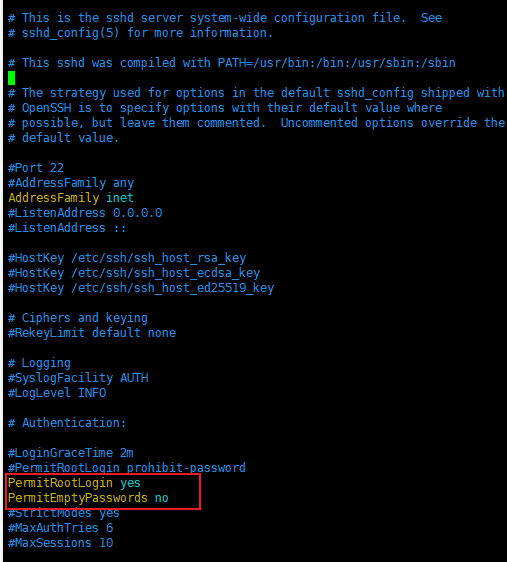
重启 ssh 服务
service ssh restart(或者执行:/etc/init.d/ssh restart)重启服务器
shutdown -r now再次通过 xshell 登录
yarn
安装 yarn https://www.myfreax.com/how-to-install-yarn-on-ubuntu-18-04/ 安装 nodejs 和 npmjs https://www.myfreax.com/how-to-install-node-js-on-ubuntu-18-04/
pm2
pm2 命令
shell
# pm2 命令
pm2 list # pm2 列表

pm2 start yarn --name demo -- start  # 运行 yarn start - 取名为demo
pm2 startup # 开机自启
pm2 unstartup # 关闭开机自启

pm2 show demo # 查看详情


pm2 monit # 监控性能

pm2 start ecosystem.config.js # 通过配置启动
pm2 start ecosystem.config.js --only myapp # 单独处理 myapp配置启动多个项目
javascript
module.exports = {
  apps: [
    {
      name: 'p57_swap',
      script: 'node_modules/next/dist/bin/next',
      args: 'start -p 3012',
      max_memory_restart: '1024M',
      cwd: '/data/p57_swap', // 根目录
      instances: 1,
      error_file: './logs/error.log',
      out_file: './logs/out.log',
      log_date_format: 'YYYY-MM-DD HH:mm Z',
      watch: true,
      ignore_watch: ['node_modules']
    },
    {
      name: 'qj_swap',
      script: 'node_modules/next/dist/bin/next',
      args: 'start -p 3011',
      max_memory_restart: '1024M',
      cwd: '/data/qj_swap', // 根目录
      instances: 1,
      error_file: './logs/error.log',
      out_file: './logs/out.log',
      log_date_format: 'YYYY-MM-DD HH:mm Z',
      watch: true,
      ignore_watch: ['node_modules']
    }
  ]
}其他
启动本地服务器
项目打包:
yarn build安装 serve:
yarn global add serve启动本地服务:
npx serve -s build或npx serve -s build